
Custody weeks everyone understands
Add the custody schedule, and everyone can see where the children are each week and who is home when.
See a week across two homesFamily planner for everyday life
Calendar, tasks and family plans – all in one place, at home and on the go.
Tuesday 13 October
The whole familyWhat's happening today
Today's tasks
Made for life as it is
Add the custody schedule, and everyone can see where the children are each week and who is home when.
See a week across two homesGrandparents and others can send messages, photos and videos to Hemvik Display with a sharing link or PIN code.
How the family stays in touchHolidays and days off land in the same plan as work and activities. Hemvik has school calendars for all Norwegian municipalities.
See all featuresExample family
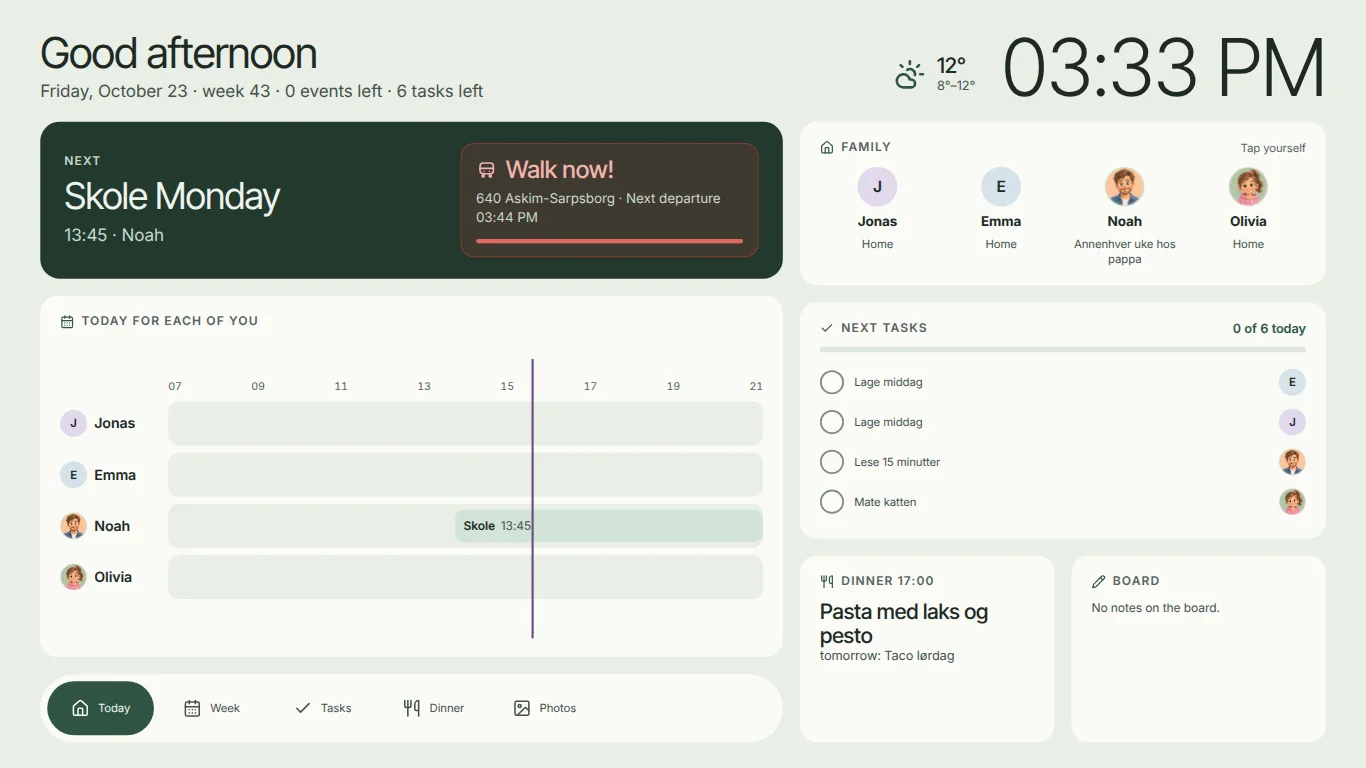
The Berg family has two children and a shared-custody schedule. Click through the day, the week, the chores and dinner.
Tuesday 13 October · week 42 · 2 appointments left · 4 chores left
15:24
R22 Rakkestad · Next departure 14:50
Today for each of you
The family
Tap yourselfNext chores
0 of 4 todayDinner 17:00
Pasta with salmon and pesto
tomorrow: Taco Saturday
The board
«I’ll pick up Emma today!»
week 43 · prices are estimates per portion
15:24
Tonight
Food budget this week
—
0 dinners priced
Plan the rest
Sunday — Add dinners in Hemvik on your phone and they will show up here.
All names and events are examples.
Create your own familyHow it works
Get started with Hemvik, add your family members and bring together your first appointments.
Add tasks, routines, school, work and meals. Choose what's useful for your family.
Connect Hemvik Display using the code on the screen, and give your family plan a visible place on the wall.
No screen needed
Features
Start with what your family needs now. The rest is ready when you want it.
Plan together
Bring appointments, work, school and activities together. Each person has their own colour, so it's easy to see whose plans they are.
See who's home, who's away and your shared parenting schedules. Make it easier to plan around everyone's day.
Share the load
Share out tasks, make the morning routine clear and let children tick things off themselves. Everyone can see the little contributions.
Plan the week's food and keep track of prices. It makes both dinner and the food budget easier to manage.
Remember what matters
See school term and holiday calendars for all Norwegian municipalities and bring your family's holiday plans together. Make school, days off and work fit together.
Get planning help from the AI assistant, and use SMS reminders for the things you need to remember.
CLOSE TO FAMILY. EVEN FROM AFAR.
Let family members outside your household send messages, photos and videos to the display using a sharing link or PIN code. A holiday update or a little hello can become part of everyday life.

Thank you for a lovely walk! Looking forward to the next one. ♥
Everyday planner. Family phone. Digital photo frame.
Pricing
Hemvik works on your phone without a screen. Hemvik Display is an optional extra.
See price and options when you create your family
Optional
A screen for the wall or worktop that shows the family plan at home.
See price and buy the displayHEMVIK DISPLAY
A digital wall display makes Hemvik visible to the whole family. In the kitchen, in the hallway or wherever you come together before the day begins.
See available display options, current prices and purchase terms when you order.
Trust
Questions and answers
Here are answers to common questions about the family planner and display.
Hemvik is a digital family planner that brings together your family calendar, tasks, routines, meal plans, shared parenting schedules, work and school. The family gets a shared overview to use on their phones and on Hemvik Display at home.
Hemvik is the system where you organise everyday family life. Hemvik Display is the digital screen you can hang on the wall to make that overview visible at home. The display can also be used for family photos, messages and calls.
You'll find current display prices, available options and purchase terms through ‘See prices and buy a display’. You'll see subscription options and what's included when you continue to Hemvik. Check both the display purchase and any ongoing costs before ordering.
Yes. Family members outside your household can send messages, photos and videos to the display using a sharing link or PIN code. It's an easy way to share moments, big and small, with everyone at home.
Yes. Hemvik has a calling feature that lets you make and receive calls on the display at home. The family can use the display as a shared place for calls.
Yes. Hemvik Display can show your family's pictures as a digital photo frame. That gives the display a place in your home even when you're not checking plans and tasks.
Yes. Hemvik gives you an overview of who's home, shared parenting schedules, work and school. You can bring your family's different plans together and make them easier to follow day to day.
Hemvik includes school term and holiday calendars for all Norwegian municipalities and supports holiday planning. The system supports Norwegian, Swedish, Danish, Finnish, German and English.
Yes. Hemvik offers meal planning with prices, SMS reminders and an AI assistant. Check which features and any usage limits are included in the subscription you choose.
Create your family, add next week and see who is picking up, who is home and what is happening.
No screen needed
HEMVIK ON YOUR PHONE
Get Hemvik in your app store.